
You cannot optimize AI spend you cannot see
A year ago the Bedrock line was a proof of concept. Someone in a sandbox tried a model, showed a demo, and turned it off. That is no longer the shape of the bill.
Inference is in the product now. A support bot. A document pass. A nightly summary. An agent that retries when the first answer is thin. Prompt caching got turned on because the second call felt faster. The same workflow landed in a second account, then a third. Finance sees one number going up. The team that owns the prompts sees a console they open when something breaks. Between those two views, the month is gone.
The tools were built for a different bill
AI usage grew into a standing cost, and the monitoring most companies already trust was built for EC2, S3, and data transfer. A Bedrock charge often shows up as its own service name per model. The token mix sits in usage-type strings: input, output, cache read, cache write. Cost Explorer could total the spend. It could not say which model, and which kind of token, took it.
On 8 October 2026, AWS added Bedrock product attributes to Cost Explorer, Budgets, and Dashboards, for usage from 1 September 2026. Model and token type are labels now, not something you reconstruct from a usage type.
That gap is why so many teams are stuck. They know AI spend is up. They cannot say whether the dollars are a large model, a flood of output tokens, or a cache that writes on every call and almost never gets read. A chart of "Bedrock, up" is a worry. It is not a decision.
You cannot optimize what you cannot see.
"Move to a smaller model" is a guess until you know the large model took most of the account, and that a third of the dollars were cache writes. A cache that writes and barely reads is a different fix from a model that is too big for the task. Both used to look identical on the invoice.
What the scan shows now
When an account's Bedrock bill is at least $10 this month, or was at least $10 last month, the account report carries a card: Bedrock, where it went. The model, its share, and the token type. The executive digest lists every account whose current month is at least $10, with the model and the token types next to the org total.
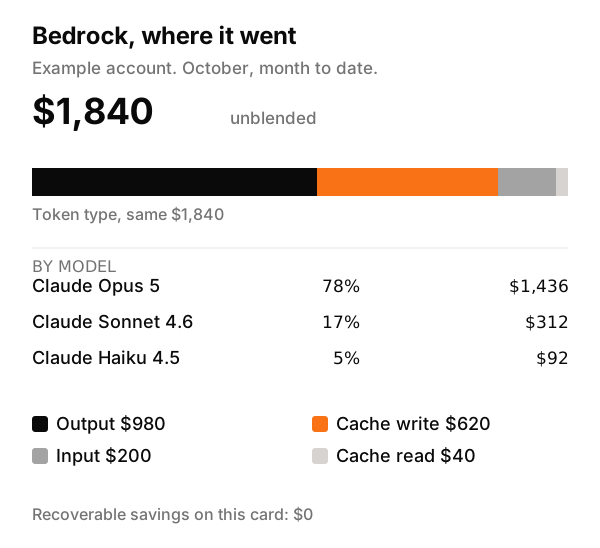
The figure is an example account. The shape is the point. Opus took most of the month. Output tokens took about half of the dollars. Cache writes took another third, and cache reads were almost nothing. That is a prompt rebuilding its cache, or a cache that never gets a second hit. You can see it on the weekly report, and you can go look.
Recoverable waste on this card is $0. A detached volume is a resource you can delete. A Bedrock charge is usage that already happened. We will not invent a savings number for switching models. The waste rules stay the waste rules. This card is the picture of the AI bill, in the same report as the idle resources.
What is still off the card
Model and token type are on the bill. The application, and the person who called it, are not. Those show up after a cost allocation tag is active on an application inference profile, a Bedrock project, or the IAM principal. Tags count from the day you enable them. Last month stays unlabeled.
On-demand, batch, provisioned throughput, and the reranker are a real split in the same AWS data. This card uses model and token type, which is where the tokens went. SageMaker, and the rest of your AI spend, stay on the service list. They are outside this card.
See it on the next scan
If Bedrock is already on the invoice, the next scan puts the split on the account report. When the current month is at least $10, the executive digest names that account too. Under $10, the card stays off. A demo that cost a few dollars does not need a paragraph.
Run a scan. Then open the account that actually calls the model.
Related: Cost Explorer shows the total. A scan names the idle resource. Catch spend drift before the invoice.
Stop paying for resources nobody is using.
Connect a read-only role. Digest by email, full web report in the app - minutes to first scan.
Start free scan→